March 29, 2026

Lukasz Paciorkowski
Founder
What 7 layers of ArchiMate actually look like when they're not theoretical
Most architects know ArchiMate has seven layers. Most have never seen all seven rendered together in a way that was actually navigable. Here's what changes when you can.
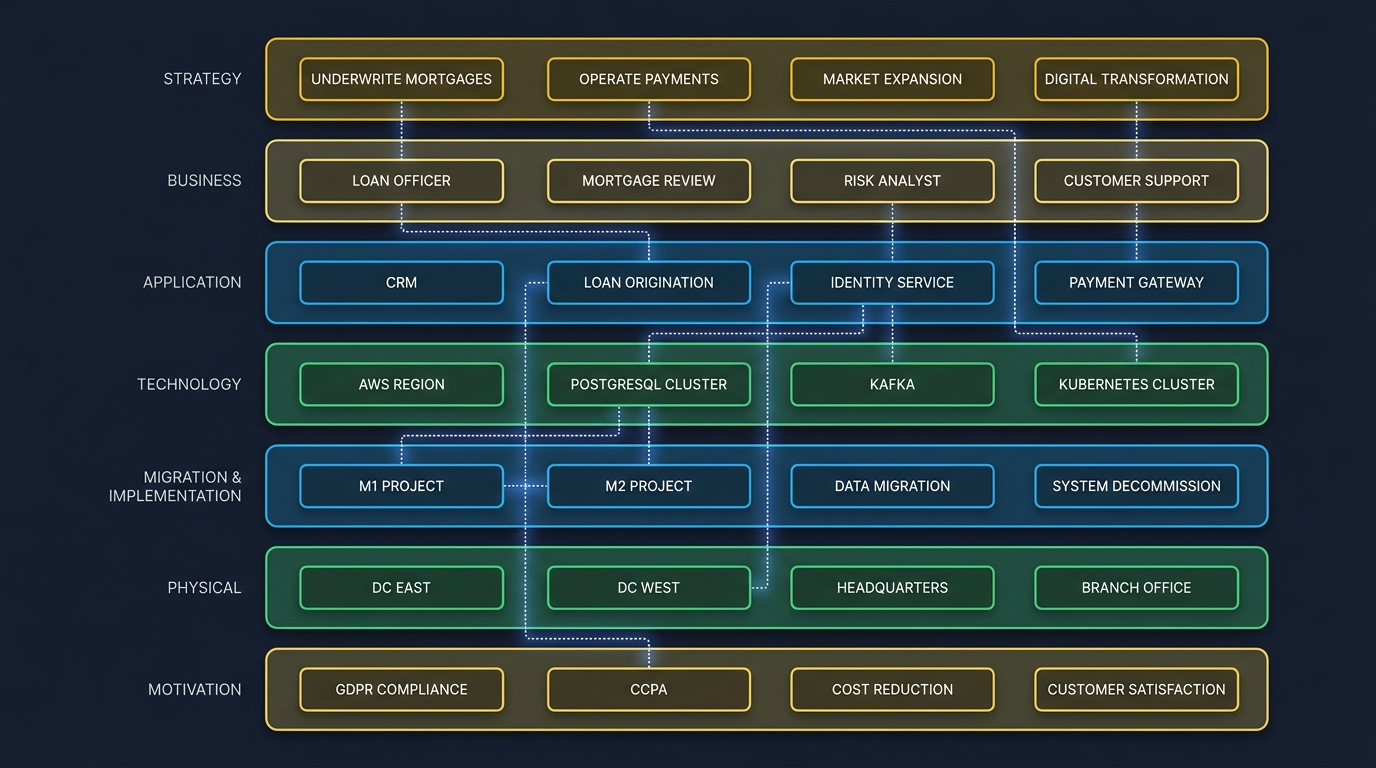
The first time most architects encounter ArchiMate's seven-layer model, they nod politely and move on. Strategy, business, application, technology, migration & implementation, physical, motivation — seven layers. Got it. Now back to drawing application landscape diagrams.
I'd done the same thing for years. I learned the layers in a certification course, used three of them seriously in my modeling work, and treated the other four as theoretical scaffolding that didn't quite make it into practice. Most enterprise architects I've worked with are in the same position. They know the seven layers exist. They've never seen all seven rendered together in a way that was actually useful.
Why? Because the tools weren't designed to show all seven. They were designed to show one — maybe two — at a time. Open a diagram, pick a viewpoint, render it. Need a different viewpoint? Close it, open another. The model is "complete" only in the sense that it contains data across all layers; the experience of it is always partial.
That gap between what the model contains and what you can see at once is more expensive than people realize. This post is about why.
What each layer is actually for
Let me walk through the layers the way I'd explain them to a new architect joining my team — concrete, not abstract.
Strategy
The reason you exist as an organization, expressed in capabilities and outcomes. A bank's "underwrite consumer mortgages" is a strategy-layer capability. So is "operate a 24/7 payments network." Strategy is what gets cut from a board deck when the company decides what not to do.
Business
The people, roles, processes, and information needed to deliver on the strategy. A "loan officer" is a business actor. "Mortgage application review" is a business process. The business layer is what shows up on org charts and in process documentation. It's the layer most architects spend the most time in because business stakeholders can read it.
Application
The software systems that support the business. CRM, loan origination platform, document management, identity provider — these are application components. The application layer is what most people think of when they say "architecture" — but it's really only one layer of seven.
Technology
The hardware, networks, runtime platforms, and infrastructure services the applications run on. Cloud regions, virtual machines, database services, message queues, container orchestrators. Technology layer is where the infrastructure team lives. Most application architects rarely look at it.
Migration & Implementation
This one most people skip in modeling, which is a mistake. It's the layer that says "we're in state X today, we're going to state Y, here's the plan and these are the work packages." A migration project is a first-class architecture artifact, not a Gantt chart in a separate tool. The migration layer is where strategy actually meets execution.
Physical
Cables, racks, server rooms, the actual data center floor plan when relevant. Most teams don't model this anymore because cloud abstracted it away. For a regulated industry — banking with on-premises requirements, pharma with localized data residency, defense — the physical layer is non-optional.
Motivation
The "why." Stakeholders, drivers, goals, constraints, principles, requirements. A regulatory requirement is a motivation element. So is a board-level directive. So is "we will not store customer data in any jurisdiction without explicit consent." Motivation is the layer that explains why every other layer looks the way it does.
These seven layers aren't decorative. Each one captures a kind of architectural information that's hard to express anywhere else without losing meaning. The problem isn't the layers — it's that we've never had a way to see them together.
Why "see them together" matters
When you can only see one layer at a time, your reasoning narrows. You start optimizing locally. The application architect rationalizes the application portfolio without seeing that two of the systems she's planning to consolidate are required by an active regulatory commitment in the motivation layer. The infrastructure team rebuilds the technology layer for cost without realizing the business layer's high-availability process depends on a specific clustering setup. The strategy lead approves a new capability without seeing that the business processes to support it require six application components nobody has budget to build.
The connections between layers are where most architecture failures originate. Not within layers — between them.
Pick a high-stakes decision your organization made in the last two years that didn't work out the way you expected. I'd bet money the post-mortem traces back to a cross-layer dependency that nobody on the decision team had visibility into when the decision was made.
That's what a 7-layer-at-once viewport changes. You're not looking at one layer's slice anymore. You're looking at the whole thing.
What "seeing all 7 at once" actually looks like
In DesignFoundry, the canvas isn't a single diagram. It's a navigable architecture viewport that holds the full model — all seven layers, all relationships, all properties — and lets you zoom across them the way you'd zoom across a map.
Some specifics:
- Zoom out and you see the whole model. The seven layers stack visibly. Cross-layer relationships render as connecting lines between layers. You can see, at a glance, that strategy-layer capability "underwrite mortgages" is implemented by business processes A, B, C, which use application components D, E, F, which run on technology G, motivated by regulatory requirements H, I.
- Zoom in to a specific layer and the others fade into the background but stay queryable. You're working in detail on the application layer, but the system still knows that your changes might affect the business processes those applications support, and it'll surface that when relevant.
- Click any element and you see all its cross-layer relationships in a side panel. An application component shows you which business processes use it, which technology it runs on, which migration project includes it, which motivations justify it. One click. No diagram-hunting.
- Query across layers in plain language: "show me all motivation elements that have no implementing application component." (That's an interesting query. Most organizations have a long list of regulatory requirements that have nothing actually built to satisfy them.) Or: "show me all technology layer components that support no business process." (Equally interesting — that's your shadow IT footprint, expressed structurally.)
The point isn't the rendering. The point is that once you can see and reason across all seven layers simultaneously, certain kinds of architectural reasoning become possible that simply weren't before.
What this changes about EA work
If you've done architecture in a tool that forced single-layer views, you've probably absorbed a working style that compensates: lots of viewpoints, lots of cross-references, lots of "let me pull up the other diagram." It's tractable but slow.
With a 7-layer viewport, the work shifts:
- Impact analysis is direct. "What's affected if we deprecate this application?" used to require an architect to traverse multiple diagrams and write up the answer. Now it's a single zoom-and-click operation. The answer is visible.
- Gap analysis is structural. "Which strategic capabilities have no implementing business processes?" is a structural property of the model, not a research project. You can see the gap directly.
- Compliance traceability is bidirectional. A regulatory requirement in the motivation layer can be traced down to the specific applications and technology components that satisfy it — in either direction, on demand. Compliance documentation generation (which I'll write about in a later post) becomes feasible because the traceability exists in the model rather than in a separate spreadsheet.
- Architecture decisions get reviewed in context. When someone proposes a change, the reviewer sees the change in the context of all the layers it touches. No more "looks good in isolation, breaks something nobody thought to check."
What this doesn't change
The seven layers don't eliminate the need for judgment. They don't decide for you which strategic capabilities are worth investing in, or which applications to consolidate, or which technology to standardize on. Those are still calls that humans make using context that's bigger than the model.
What the seven layers do is make the consequences of those calls visible. You decide to deprecate an application; the model shows you what depends on it. You decide to add a new capability; the model shows you what business processes and applications you'll need to support it. You're still making the decision. You're just making it with the whole picture in view, not a slice.
That, in my experience, is the difference between an EA practice that produces decisions people trust and one that produces documents people ignore.
Try it on your own model
If you're an early-access customer, the 7-layer viewport is live. Try this: open your model, zoom all the way out, and look at the layers you've under-populated. Most organizations have a rich application layer, an okay business layer, and almost nothing in motivation or migration. That gap isn't a tool problem. It's an artifact of years of single-layer thinking. The viewport makes it visible. Filling the gaps changes the conversations you can have.
ArchiMate had seven layers for a reason. We just hadn't built a tool that let you use all seven until now.