April 9, 2026

Lukasz Paciorkowski
Founder
200+ systems mapped in 2 days: the auto-discovery breakdown
Mapping a 200-system landscape used to be a twelve-week project. Here's the recommended approach for getting it done in two days, hour by hour — and where human judgment still needs to live.
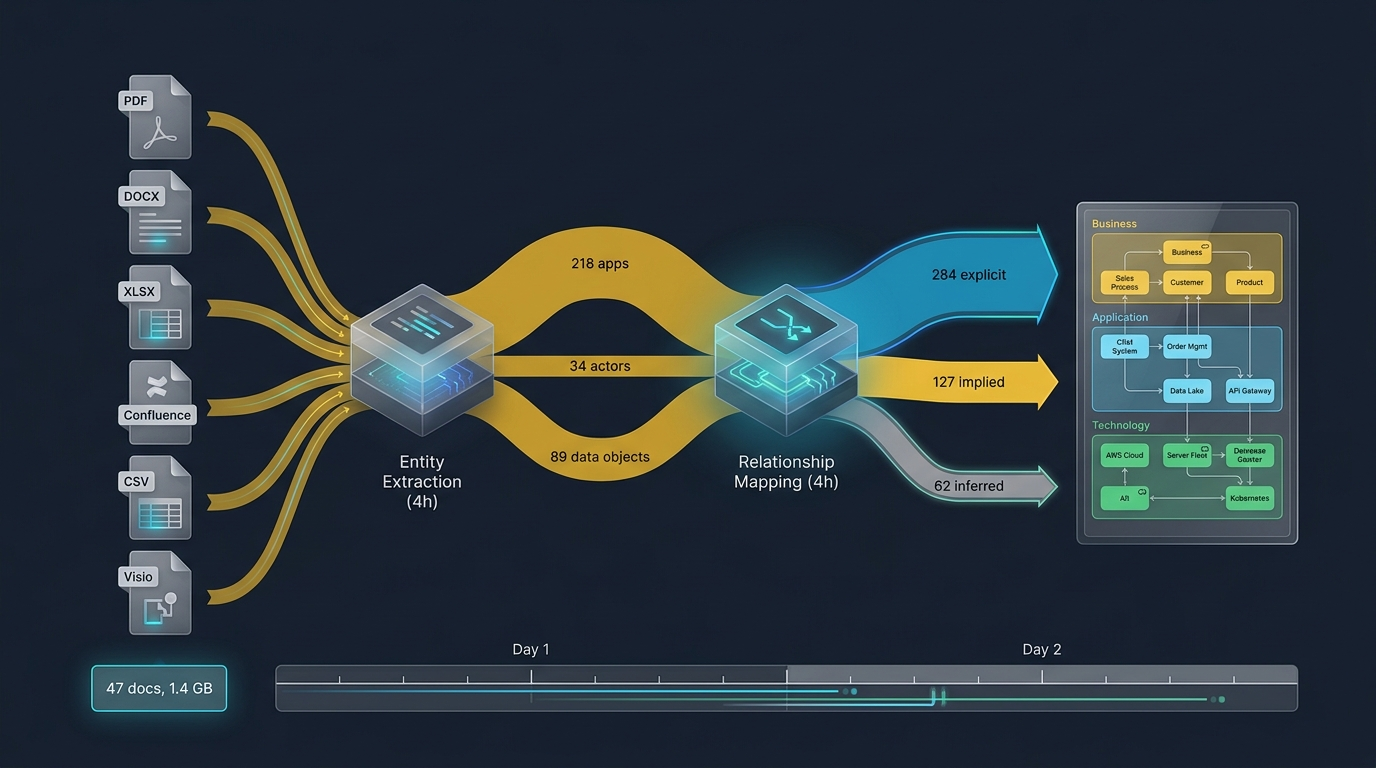
Most established organizations carry a recognizable EA dilemma. Leadership wants a current-state application landscape — usually because the CIO wants to know what's actually in the estate before deciding what to rationalize. The architecture team estimates 12-16 weeks of work. That estimate gets the project killed, or pushed to a future quarter that never arrives.
We've watched the pattern enough times to design around it. This post walks through the recommended approach for mapping an organization-scale landscape — 200+ applications, fifteen years of accumulated integrations, multiple acquisitions — in two days rather than three months. It's a methodology you can run on your own estate.
The "two days" claim isn't a sales line; it's a structural property of how auto-discovery + human review pipelines combine when done right. Below is the hour-by-hour breakdown of what that actually looks like.
~210
application components (typical mid-size estate)
~325
integration relationships
2 days
elapsed time end-to-end
What you'd typically have to work with
Before walking through the approach, here's what most organizations actually have when they start this work — the kind of unstructured mess that the modeling project has to absorb:
- A SharePoint folder labeled "Architecture" with a couple hundred documents in mixed formats — PDFs from procurement contracts, Word documents describing systems for past audits, Visio diagrams that may or may not still reflect reality, Excel sheets with an integration inventory that hasn't been updated in 12-18 months, PowerPoints from architecture review board meetings.
- A Confluence wiki with a "Systems" section containing dozens of system pages of varying completeness and currency.
- An asset-management database with the canonical list of applications (vendor, owner, cost-center fields populated) but no relationship information.
- A handful of architecture decision records — often shockingly few for the size of the estate, sometimes just one or two for the whole organization.
- No formal architecture model in any tool. The "model" is the union of all the above.
This is what auto-discovery has to work with in practice. Not a clean ArchiMate XML. Not a structured graph. A mess of unstructured documents that describe the architecture but don't model it. The job is to turn that mess into a coherent model.
The day-by-day breakdown
Setup and document ingestion
Point DesignFoundry at the SharePoint folder, the Confluence wiki (via export), and the asset-management database (via CSV). Setup takes about ninety minutes — most of it is waiting for the SharePoint export to complete. By the end of hour 2, all source material is in the pipeline: a few dozen PDFs, hundreds of wiki pages, hundreds of asset records, plus Visio exports, Excel sheets, and PowerPoints. Typically 1-2 GB of source data.
Entity extraction
This is where the heavy lifting happens. The extraction pipeline scans the source material and identifies architectural elements — applications, business actors, application services, technology nodes, data objects — and populates a candidate model. For a 200-app estate, a typical output after four hours is on the order of: 200+ application components (often a few more than the asset database has — those are systems mentioned in source documents that weren't in the canonical list, which is itself an interesting finding), several dozen business actors, 50+ application services, 40+ technology nodes, ~90 data objects.
The flagging matters more than the extraction. Roughly 80% of the applications will be high-confidence (referenced in multiple sources, consistent properties); the remaining ~20% have lower confidence with specific reasons attached. That ratio holds across most estates we've modeled.
Relationship mapping
This is the part architects find most tedious by hand. The pipeline does three kinds of mapping: explicit (a source document literally says "System A sends transactions to System B via the integration bus"), implied (two systems are described as operating on the same data, or both appear in the same end-to-end process), and inferred (topology suggests a relationship that wasn't stated outright). After four hours of mapping, a typical 200-app estate generates ~280 explicit relationships, ~120 implied (flagged for review), and ~60 inferred (low confidence — these are the ones the reviewing architect tends to push back on). The model is structurally complete by end of Day 1 — not validated, not reviewed, but structurally complete.
Human review
This is where the time the script doesn't show happens — and it's where most of the architect's effort goes. The reviewer sits with the candidate model open. The interface shows items in priority order: lowest-confidence first. In three focused hours of work, an experienced architect typically approves the high-confidence applications without modification, corrects vendor info on roughly a quarter of the lower-confidence items, rejects a small number as duplicate identifications (acquisitions had renamed them), approves all the explicit relationships, rejects 10-15% of the implied/inferred ones, and marks a small handful for follow-up with system owners. By the time the reviewer stops for the night, the model is reviewed except for the items needing owner verification.
Investigation and finalization
The remaining work is contacting system owners for the flagged items — typically a dozen or two questions across the whole estate. A Slack channel works well; most owners respond within hours. By end of Day 2, the bulk of items are resolved (a small handful of edge cases may get deferred). The final model is exportable to ArchiMate 3.2 with no data loss, round-trip tested with Archi and Sparx EA. Total elapsed: 2 days. Reviewing architect's hands-on time: ~8 hours.
What "auto-discovery" actually means
It's worth being specific about this because the term gets overused.
Auto-discovery isn't fully automatic. The model doesn't get built without human judgment. What it means in practice is that the grunt work of going through source material, extracting entities, and proposing relationships gets done by the pipeline, and the human's role shifts from "construct the model from scratch" to "review and correct the candidate model."
That shift compresses the work because:
- Reading documents to extract entities is the most boring, repetitive part of EA modeling. The AI is faster and doesn't get tired. The architect's judgment is preserved by reviewing low-confidence items, not by re-extracting everything.
- Mapping relationships is the most error-prone part. The AI surfaces evidence for each relationship; the architect verifies. Errors are more discoverable when the evidence is presented inline.
- Iteration is fast. If the architect wants to re-run extraction with different parameters or add more source material, that can be done without losing prior corrections — the candidate model updates, the prior approvals and rejections are preserved.
This is fundamentally different from "AI built a model from scratch and the architect just accepted it." That would be irresponsible and the result would be unreliable. Auto-discovery is a collaborative process where the AI does the heavy lifting and the architect does the judgment.
What it won't do
A two-day model isn't done in the sense that no further work is needed. The boundaries are worth being clear about:
- Strategy and motivation layers will be sparse. Source material rarely contains enough about strategic intent or regulatory drivers behind specific systems for the AI to populate those layers meaningfully. Those layers need to be added afterwards from board materials and compliance documentation — usually by a person, not by extraction.
- The model captures current state, not future state. Migration planning, target architecture, transition states — those are forward-looking artifacts that auto-discovery can't produce from documents about how things are now.
- Validation work still remains. The model says what the documents say. Where the documents are wrong, the model is wrong. Reconciling against operational reality — for systems where documentation is known to be stale — is a separate workstream that happens after the initial mapping.
But here's the thing: with this approach, the team starts that reconciliation work from a complete, structurally consistent model in two days. Without auto-discovery, they'd spend twelve weeks building the model and then start the reconciliation. The compression is real, and most of it accrues to the human judgment work that mattered most.
What this means for EA teams
If you've been quoting 12-16-week timelines for landscape modeling projects and getting them killed by leadership, this approach genuinely changes that math. The conversation shifts from "do we do this project" to "let's do it this week, then talk about what we found."
It doesn't make architects obsolete. It makes them deployable on work that actually requires their judgment — strategy alignment, decision architecture, capability planning. The grunt work that used to fill their calendars is the part that gets compressed.
If your organization has a landscape it's never managed to map, this is the most direct way to get to "we have a model" — not in six months, but in a week.